What is SPF Spam Protection?
An SPF record specifies which mail servers are allowed to send emails on behalf of your domain. This improves deliverability and reduces the risk that emails from your domain are classified as spam or forgery.
Table of Contents
Check SPF Record in CloudPit
Log in to CloudPit.
Click MORE next to the desired domain and select DNS Management.
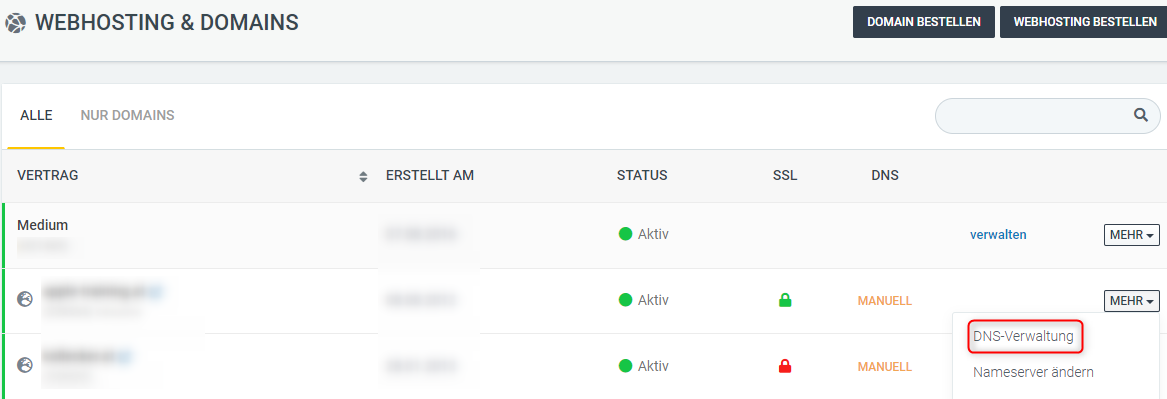
The SPF record is a TXT record that starts with v=spf1.
If you use our mail servers, the SPF record is set automatically.
The default SPF record for our mail servers in CloudPit is:
v=spf1 a mx include:secure-mailgate.com ~all
Check SPF Record in Controlpanel
Log in to the Controlpanel.
Open Domains and click DNS next to the desired domain.
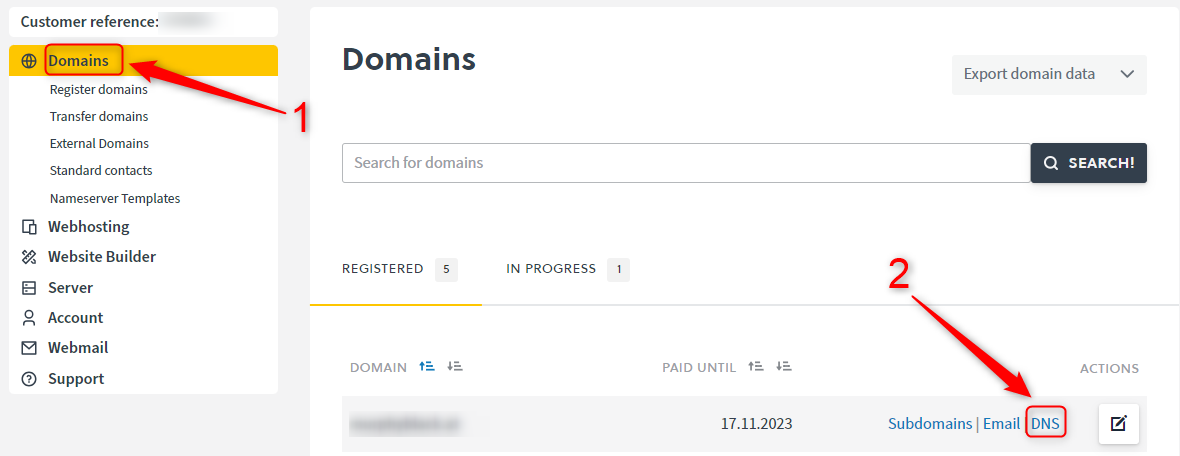
The SPF record is a TXT record that starts with v=spf1.
If you use our mail servers, the SPF record is set automatically.
The default SPF record for our mail servers in the Controlpanel is:
v=spf1 include:spf.easyname.com -all
Extend SPF Record
If you also send via external mail servers or external services, the existing SPF record must be extended.
Example for an additional mail server:
v=spf1 include:mailserver.example.com -all
Example for an additional mail server and an additional IP address:
v=spf1 include:mailserver.example.com ip4:77.244.243.83/32 -all
Always add new servers or IP addresses to the existing SPF record. Do not create a second SPF record.
To create or check an SPF record, you can use external tools, for example SPF-Record by nicmanager.