In this section
How do I cancel a direct debit authorization?
A stored SEPA direct debit can be removed if you no longer want to use it for payments. The procedure differs depending on the system.
Note: This article differs depending on the system (CloudPit or Controlpanel). Please use the appropriate section.
Table of Contents
Have the direct debit removed in CloudPit
In CloudPit, you cannot remove a stored SEPA direct debit yourself. The removal is carried out by support.
Send an email to billing@easyname.com for this purpose.
Include the following information in your request:
- Customer number
- Phone PIN for verification
- Brief information stating that the stored SEPA direct debit should be removed
Note: For security reasons, we cannot remove the direct debit without the phone PIN.
Remove the direct debit in Controlpanel
Log in to the Controlpanel.
Open Account (1) → Direct Debits (2).
Click on Delete (3) next to the stored direct debit.
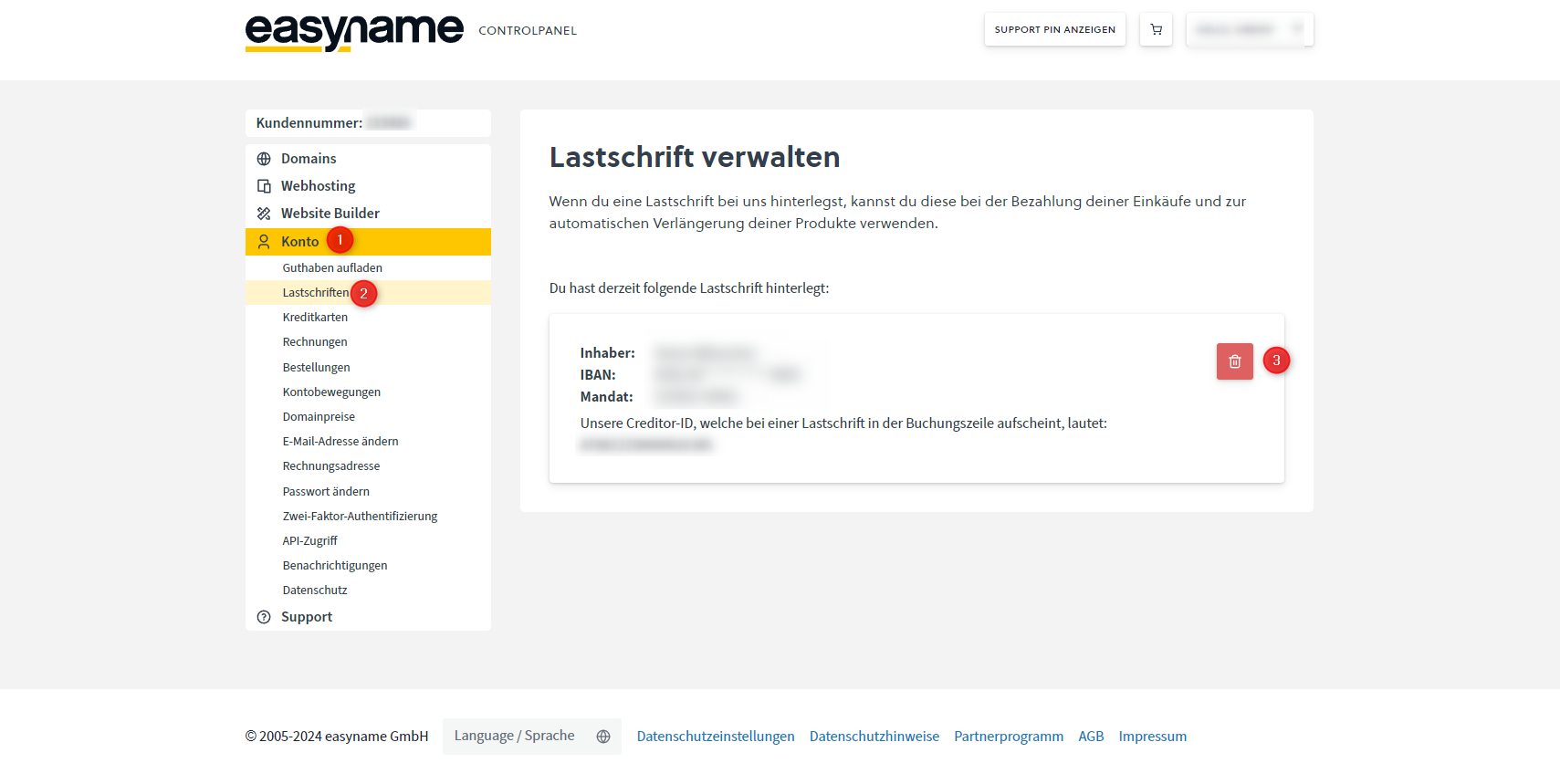
Confirm the prompt to permanently remove the direct debit.